
- 8.7-inch HD touchscreen with built-in smart home hub
- AZ3 Pro chip and Omnisense technology
- Room-filling spatial audio for music and shows
- Shows recipes, calendar and shopping lists at a glance

- 5-in-1 keyless entry: fingerprint, code, knock, key, phone
- Fits standard doors with one hole, screwdriver only
- Remote unlock and entry log via smartphone app
- 2nd Gen fingerprint ID with self-learning algorithm

- Retrofits existing blinds without replacing louvers
- Pack includes 3 Blind Tilts and a SwitchBot Hub Mini
- Built-in 2000mAh battery with solar panel charging
- Controls up to 4 blinds per button, unlimited groups

- Stores up to 8GB of motion-activated video, no monthly fee
- Dual cameras cover the doorstep and the ground
- Wired power or 10,000mAh battery
- 2K QHD video with infrared night vision

- Saves up to 23% a year on heating and cooling
- Compatible with 85% of systems, checker on support page
- Color touchscreen and app for temperature changes
- Adjusts to your schedule and tracks energy use
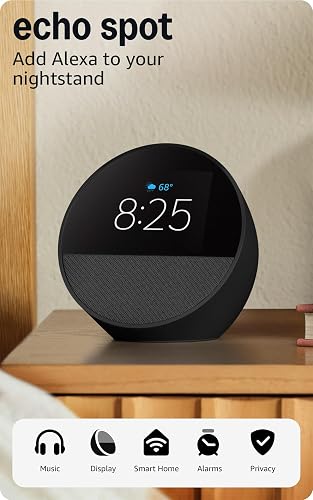
- Smart alarm clock with Alexa and vibrant sound
- Customizable clock face showing time, weather, songs
- Rich sound with clear vocals and deep bass
- Alexa routine wakes you with music and gradual light
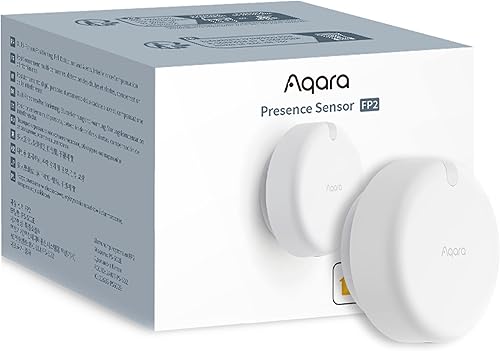
- Radar sensor covers up to 40㎡ with 30 zones
- Detects up to 5 people at the same time
- Millimeter-wave radar with adjustable interference areas
- Works with HomeKit, Alexa, Google Home and Home Assistant

- RGBICWW light bar for monitors under 45 inches
- Built-in mic syncs lighting to sound
- Matter support, voice control via Alexa and Google Home
- Govee app for segments, schedules and room groups

- Control small appliances from anywhere
- Works only with the Tapo app, not Kasa
- Family members can each control the plug
- Set schedules for appliances, such as a morning coffee pot

- Built-in Swiss-made sensor for temperature and humidity
- Smart Learning controls TVs and air conditioners via infrared
- Temperature, humidity and light trigger automated scenes
- Two included buttons for appliances or scenes
Why Choosing Smart Home Devices Feels Hard
Smart home shopping is hard partly because the categories overlap. A display, a speaker, a plug and a hub can all claim to control your lights, so it’s easy to buy something you don’t need or miss a device that would have covered two jobs at once. Start by listing the one or two problems you want solved, such as getting into the house, knowing who is at the door, or lowering your heating bill. Then look for the device that handles that job directly, instead of the one with the longest feature list.
Compatibility is the other common trap. Many products work with Alexa, Google Home or Apple Home, but not all of them work with each other, and some need a separate hub to connect. Check the assistant you already use before you buy, and note whether a device needs a hub or connects straight to your Wi-Fi. A device that depends on a hub you don’t own is a second purchase you may not have budgeted for.
Your home’s own setup can also decide the answer. A smart lock needs a door that fits its installation style, and a thermostat depends on your heating and cooling system. Blinds, a plug, or a light bar will only suit certain windows, outlets, or screens. Measuring first and reading the compatibility notes on the listing will save you a return.
1. Amazon Echo Show 8 (newest model)
This is a smart display with an 8.7-inch HD touchscreen. You can watch shows, see your calendar, manage shopping lists, and control lights and thermostats from one screen.
- Strong speaker with spatial audio for music and video
- Auto-framing camera with 3.3x zoom for video calls
- Built-in smart home hub that works with thousands of Alexa devices
Physical button to turn off the mic and camera
Features like Alexa+ depend on what’s available in your area and account.
2. ULTRALOQ UL3 BT (2nd Gen) Smart Lock + Bridge WiFi
This is a smart lever lock that replaces your existing door handle on standard doors. The listing names side doors, garage entries, basements, wine cellars and home offices among its suitable uses. You can open it with a fingerprint, a code, a knock, a mechanical key, or your phone.
The installation is the main selling point. The lock works on standard doors with a single hole, provided the door is between 1-5/16″ and 2″ thick and has a 2-1/8″ face bore hole. If your door falls within those measurements, the included screwdriver is all you need to swap out the existing lever or knob.
Remote control works through the bridge. Once the included WiFi bridge is set up, you can unlock the door, share access, and check a log showing who entered and exactly when, all from the smartphone app, even when you’re away from home.
Check your router before you buy. The listing specifies 2.4GHz WiFi (802.11 b/g/n) connectivity. Fingerprint access is described as instant and self-learning.
3. SwitchBot Smart Electric Motorized Blinds Kit
This kit turns existing horizontal blinds into smart blinds. You don’t need to replace your blinds. It’s best for people who already own horizontal blinds with a pole and want automation without a big project.
Before you buy, measure the pole. The listed range is 6.2 mm to 10.2 mm, plus 12 mm. If your pole falls outside that range, the Blind Tilt won’t fit it. Check this first, because it decides whether the kit works for your window at all.
The tilt sensor is the part that sets this kit apart from a simple motor. The built-in light sensor adjusts the blinds to keep light steady, so you aren’t just opening and closing them but holding a level of brightness. The motor moves in steps as fine as the closest 2°, which gives you control over the slats rather than an on-or-off setting.
Group control is useful if you have several windows. One button can move up to 4 units when you’re in Bluetooth range. With the included hub, you can set unlimited groups, so a whole room or floor can be controlled together.
The app works at home, but voice assistants like Alexa, Google Home and Siri, along with remote control from outside the house, depend on the hub.
If your windows use vertical blinds, stop here. This kit is designed for horizontal blinds only, and no adapter is mentioned for vertical blinds, so you would need a different product.
4. PHILIPS Security Video Doorbell Camera with Chime
This is a video doorbell with two cameras, one facing the visitor and one facing down at the ground and packages. It’s best for people who want to see who’s at the door and watch their porch.
The downward camera is the part that sets this model apart. Most doorbell cameras only capture a face at the door, so a package left at your feet or someone standing right against the frame can be missed entirely. With both views running, you get the visitor and the spot where deliveries actually land.
- Dual cameras reduce blind spots near the door
- 2K video with infrared night vision
- Two-way audio with a built-in mic and speaker
- Works with Alexa and Google Assistant
- Stores video on the device with no monthly fee listed
Recordings are motion-activated and saved to the device’s storage, which is up to 8GB according to the product listing. Because video is stored locally rather than in a cloud plan, you can review clips without paying a subscription.
The battery option is a 10,000mAh pack, so you can mount the unit without running wires. If you go with wired power instead, the listing requires 8-24V and more than 10VA. Check your existing doorbell transformer against those figures before you buy. A lower-output transformer won’t meet the requirement, and in that case the battery version is the one to choose.
- Live streaming comes only from the front camera.
- Wired power needs 8-24V and more than 10VA, so check your doorbell wiring first.
5. ecobee Smart Thermostat Essential
This is a WiFi thermostat with a color touchscreen, and it’s built for homes that want to manage heating and cooling while keeping rooms comfortable. The main idea is that it learns your routine on its own: it adjusts the temperature to your set schedule so the house isn’t conditioned at full strength while you’re away, then brings it back to a comfortable level when you’re home.
Setup matters more than most people expect, and the first step is confirming the thermostat fits your equipment. It’s designed for most common 24 VAC systems, including gas, oil, electric, dual fuel, forced air, conventional systems, heat pumps, and boilers. Use the ecobee Compatibility Checker on the ecobee support page before you buy, and have your current wiring and system type ready when you do.
If the check shows your home has no C-wire, the thermostat can’t power itself from the wiring alone. That’s common in older homes. The fix is the ecobee Power Extender Kit (PEK), which is sold separately, and the trim kit is also sold separately if you want the wall to look tidy after installation. Budget for those accessories before you start, because they’re easy to overlook in the listing and are often needed.
For a broader picture of how the house is heated and cooled, the optional SmartSensor measures temperature and movement in the rooms you choose, so you can keep an eye on the places that matter most. The SmartSensor 2 pack is sold separately. You can also check your energy consumption from the ecobee app when you’re away from home.
6. Amazon Echo Spot
This is a small smart alarm clock with a screen and Alexa. It’s best for a nightstand, office, or kitchen counter. It can wake you gently with music and light and control smart devices.
The screen is what sets it apart from a plain speaker. You can see the time, the weather, and the titles of songs you’re playing at a glance, and you can touch the display to dim it or control your music. You can also personalize the clock face and colors to suit the room it sits in.
Its wake-up routine works in two layers. You set up an Alexa routine that starts with music and gradually brings up the light, so you ease into the morning instead of being jolted awake. Because the same routine can check reminders or give you the weather, it doubles as a morning briefing.
The sound is bigger than you’d expect from a device this size. Vocals come through clearly, and there’s real bass for podcasts, audiobooks, and music. If you want the speaker mainly for background audio in a bedroom or kitchen, this is one of its strongest uses.
With eero Built-in, the Echo Spot doubles as a mesh WiFi extender, adding up to 1,000 square feet of coverage to an existing eero network. This only applies if you already use eero, so check your network before counting on it.
For privacy, the mic off button physically cuts off the microphone, and you can manage more controls in the app. That’s useful if you want the clock in a bedroom but don’t want it listening all the time.
- Big sound for its size, with clear vocals and bass
- Gradual light and music wake-up routines
- Built-in mesh WiFi extender for up to 1,000 square feet
Mic off button for privacy
The mesh extender feature works with an eero network.
7. Aqara Presence Sensor FP2
This is a radar-based presence sensor that detects people in a room without a camera. It’s best for people who want lighting or heating to respond to whether someone is in a space. It can cover up to 40 square meters.
- Detects presence without using a camera
- Up to 30 zones you can set up separately
- Can detect up to 5 people at once
- IPX5 waterproof rating, so it suits bathrooms
- Works with HomeKit, Alexa, Google Home, and Home Assistant without a separate hub
8. Govee Smart Light
This is a light bar that mounts behind a TV or monitor. It’s best for gaming and movie watching, adding color that follows the screen or the sound. It works with Alexa and Google Home without a hub.
The biggest choice you’ll make is how to mount it. You can lay the bar flat on a surface, stand it upright, or attach it behind the screen with the brackets that come in the box. Behind-the-screen placement is where the effect is strongest, because the glow spreads onto the wall around the TV and the edges of the picture feel wider. Flat placement suits a desk or shelf, where you mainly want a soft color wash rather than a backlight.
Music sync is the feature that makes this stand out from a plain backlight. The built-in mic listens to the room and changes the colors to match what you’re hearing, so a loud action scene or a bass-heavy song will shift the lights along with it. Because the mic picks up sound from wherever the bar sits, keep it away from the TV speakers if you want the lights to respond to the game or movie audio rather than to a loud fan or a conversation.
The color control has two sides. You can set a warm or cool white for reading or everyday use, then switch to bright RGBIC colors for games and films. The app lets you save the combinations you like, group this bar with other Govee lights in the same room, and set schedules so the lights come on and change without you touching anything.
9. TP-Link Tapo Smart Plug Mini
This is a small WiFi smart plug that turns any plugged-in device on or off from your phone or voice. It’s best for lamps, coffee makers, or fans, and it needs no hub. The listing describes quick setup using Bluetooth and the Tapo app, and says no hub is required.
The main reason to buy it’s control from anywhere. Whether you’re in another room or away from home, you can switch the appliance on or off from your phone. Scheduling adds a second layer: you can set times for each device so the coffee pot starts before you wake up or the lamp turns off at bedtime without you touching anything.
Because the plug works with Alexa and Google Home, you can also use voice commands once it’s connected. That makes it a practical choice for a device you reach for often, like a bedside lamp.
Multiple family members can each control the plug from their own phones, with no need to share a login. This is useful in a household where more than one person needs to turn a fan or lamp on and off, since nobody has to wait for someone else to act.
If you have a wall outlet with a bulky adapter already in place, this smaller size helps you keep both outlets in use.
Before you buy, check which app you’ll need. Tapo devices work only with the Tapo app. The Kasa app isn’t compatible, so if you already have Kasa devices, you’ll need to set up this plug in Tapo separately.
Finally, match the plug to what you’re powering. It’s rated for light use, with a maximum load of 10 amps and 1200 watts.
10. SwitchBot Hub 2 (2nd Gen)
This is a WiFi hub that reads the temperature, humidity, and light in a room. It also learns infrared remotes so you can control TVs and air conditioners through your voice or app. It’s best for people who want one hub for many devices.
- Built-in temperature and humidity sensor with a light sensor
- Smart learning for infrared remotes
- Two smart buttons for simple one-tap controls
Supports Matter for compatible SwitchBot devices
It works on 2.4GHz WiFi only.
- Full use with other SwitchBot devices needs the hub set up first.
Frequently Asked Questions
Do I need a hub for smart home devices?
Not always. Some devices, like the Tapo plug and the Aqara FP2, work with Alexa or Google Home directly. Others, like the SwitchBot blinds kit, need the included hub to work from outside the house.
Which voice assistant works with the most devices?
Alexa, Google Home, and Apple Home each support many products. Check each listing’s compatibility notes before you buy, since support varies by device.
Are smart cameras and doorbells safe for privacy?
Most listed devices include mic and camera controls. The Echo devices have physical mic buttons. The Aqara FP2 uses radar and no camera at all.
Can I install these myself?
Many are made for DIY setup. The ULTRALOQ lock and SwitchBot blinds need only basic tools. The ecobee thermostat may need an extra power accessory if your home has no C-wire.
Will my WiFi be enough?
Several devices use 2.4GHz WiFi only. Check your router, and place sensors within the distance the listing recommends.
Conclusion
The best smart home device for you depends on the job you need done. Start with one room or one problem, like door security or heating control. Check the compatibility notes, then pick the device that fits your home.